Practical Korea travel information, checked against Korean sources.

Tag: maps and apps in korea

  • The Seoul Subway Transfer Your App Does Not Warn You About

    This guide is written in two parts. English first, Korean below. 이 글은 두 파트로 되어 있습니다. 영문이 먼저, 한국어가 아래에 있습니다.


    PART 1 — ENGLISH

    Your app says the trip takes 38 minutes with one transfer. Another route takes 41 minutes with none.

    You take the 38. Then you spend six minutes walking through a tunnel with a suitcase, and arrive later than the other route would have got you there.

    Seoul transfer distances range from about 200 metres to 414 metres, and no mainstream routing app shows you which one you are about to walk. The minute estimate absorbs the walk into a single number, so a long transfer and a short one look identical on screen.

    Here is which ones are long, and when it changes your decision.

    1. The numbers

    Measured transfer corridors at the stations visitors actually use (Hyundai Rotem):

    Station Transfer Distance On foot
    Hongik Univ. Line 2 ↔ Gyeongui-Jungang 414 m ~5 min 45 s
    Seoul Station Line 1 ↔ Airport Railroad 365 m ~5 min
    Hongik Univ. Line 2 ↔ Airport Railroad 355 m ~5 min
    Express Bus Terminal Line 7 ↔ Line 9 314 m ~4 min 20 s
    Jongno 3-ga Line 1 ↔ Line 5 312 m ~4 min 20 s
    Nowon Line 4 ↔ Line 7 278 m ~3 min 52 s
    Jamsil about 200 m for comparison

    Hongik Univ. Station has the longest transfer in the network — and it is the station most visitors arrive at from Incheon Airport, on the day they are carrying the most.

    Those times assume you walk briskly and unencumbered. With a large suitcase, in a crowd, add to them.

    2. Why the app cannot tell you

    Routing apps optimise for total minutes. A transfer is priced into that number as walking time, so a 414-metre transfer and a 200-metre one both just make the total slightly larger.

    What the number cannot express:

    • Whether the walk includes stairs or only escalators
    • Whether you will be dragging luggage the whole way
    • Whether it is a single corridor or several level changes
    • How it feels at rush hour, when the corridor is as crowded as the train

    None of that is in “38 min”. Two routes with identical estimates can be very different experiences.

    3. When it actually changes your decision

    Most of the time, do not think about it. A few minutes of walking is not worth planning around when you are unencumbered.

    It matters in four situations:

    Carrying a large suitcase. This is the big one. A 400-metre corridor with a checked-size case is meaningfully harder than the same distance empty-handed, and if there are stairs it is worse. Prefer the route with fewer changes even if the estimate is a little longer. More in taking luggage on Seoul transport.

    Tight connection to a flight or KTX. The estimate assumes you make the walk at normal pace. If you are cutting it fine, a long transfer eats the buffer you thought you had.

    Mobility limits, or travelling with small children. The distance is the same but the cost is not, and lift routes are often longer than the walking route.

    Late at night. Trains run less often, so missing one because the transfer took longer than you expected costs more than a few minutes.

    4. What to do instead

    There is no app that ranks routes by transfer comfort, so the practical substitutes are these.

    Count transfers, not just minutes. A direct route at 41 minutes usually beats a one-change route at 38 when you are loaded. This single habit handles most cases.

    Recognise the long ones. If your route passes through Hongik Univ., Seoul Station, Express Bus Terminal or Jongno 3-ga and involves a change there, assume five minutes of walking rather than two.

    At Hongik Univ. specifically, check whether you need to transfer at all. The Airport Railroad and Gyeongui-Jungang platforms have their own street exits — numbers 3 to 7. If your destination is on that side you can leave from there and skip the corridor entirely. That station is covered in detail in our guide to its layout.

    Use Naver Map for the exit number. It gives exit numbers where Google Maps cannot give walking directions at all, and coming out of the right exit saves more time than any transfer choice.

    5. One thing that works in your favour

    Long transfers do not cost you money. Under Seoul’s integrated fare system, a transfer within the allowed window is a continuation of the same journey, not a new fare — and the window is generous enough that even a 414-metre walk does not threaten it.

    The rules, including the night-time extension most guides miss, are in the transfer discount guide.

    6. Before you go

    • Seoul transfer corridors run from about 200 m to 414 m
    • Hongik Univ. Line 2 ↔ Gyeongui-Jungang is 414 m — the longest in the network
    • Its Line 2 ↔ Airport Railroad transfer is 355 m, and that is the one arrivals meet
    • Seoul Station Line 1 ↔ Airport Railroad is 365 m
    • Apps fold the walk into the total, so long and short transfers look the same
    • Count transfers, not just minutes — especially with luggage
    • Assume five minutes of walking at the stations above, not two
    • At Hongik Univ., check whether you need to transfer at all — exits 3–7 are on the other side
    • A long transfer does not cost extra fare

    PART 2 — 한국어

    앱이 38분에 환승 1회라고 합니다. 다른 경로는 41분에 환승이 없습니다.

    38분을 고릅니다. 그리고 캐리어를 끌고 통로를 6분 걷고, 결국 다른 경로보다 늦게 도착합니다.

    서울 지하철 환승 거리는 약 200m에서 414m까지 벌어지는데, 주요 길찾기 앱 어디도 지금 걸을 통로가 어느 쪽인지 알려주지 않습니다. 소요시간 숫자가 도보 구간을 하나의 값에 녹여버려서, 긴 환승과 짧은 환승이 화면에서 똑같아 보입니다.

    어디가 긴지, 그리고 언제 판단이 달라져야 하는지 정리했습니다.

    1. 숫자

    방문자가 실제로 쓰는 역들의 실측 환승 거리입니다(현대로템).

    환승 거리 도보
    홍대입구 2호선 ↔ 경의중앙선 414 m 약 5분 45초
    서울역 1호선 ↔ 공항철도 365 m 약 5분
    홍대입구 2호선 ↔ 공항철도 355 m 약 5분
    고속터미널 7호선 ↔ 9호선 314 m 약 4분 22초
    종로3가 1호선 ↔ 5호선 312 m 약 4분 20초
    노원 4호선 ↔ 7호선 278 m 약 3분 52초
    잠실 약 200 m 비교용

    홍대입구역이 서울에서 가장 긴 환승을 갖고 있습니다. 그리고 인천공항에서 오는 방문자 대부분이 도착하는 역이며, 하필 짐이 가장 많은 날입니다.

    위 시간은 빠르게, 짐 없이 걸었을 때입니다. 큰 캐리어를 끌고 인파 속을 지나면 더 걸립니다.

    2. 앱이 알려줄 수 없는 이유

    길찾기 앱은 총 소요시간을 기준으로 최적화합니다. 환승은 도보 시간으로 그 숫자에 반영되므로, 414m 환승과 200m 환승 모두 그냥 총합을 조금 늘릴 뿐입니다.

    숫자가 담지 못하는 것들이 있습니다.

    • 그 구간에 계단이 있는지 에스컬레이터뿐인지
    • 그 길을 짐을 끌고 가야 하는지
    • 통로 하나인지 층을 여러 번 오르내리는지
    • 혼잡 시간대에 통로가 열차만큼 붐비는지

    “38분”에는 이 중 아무것도 없습니다. 같은 예상 시간의 두 경로가 전혀 다른 경험일 수 있습니다.

    3. 실제로 판단이 갈리는 상황

    평소에는 신경 쓸 필요 없습니다. 짐이 없다면 몇 분 걷는 건 계획에 넣을 값어치가 없습니다.

    문제가 되는 건 네 경우입니다.

    큰 캐리어가 있을 때. 이게 가장 큽니다. 위탁수하물 크기 캐리어로 400m 통로를 지나는 건 빈손으로 같은 거리를 걷는 것과 확실히 다르고, 계단이 끼면 더합니다. 예상 시간이 조금 길더라도 환승이 적은 경로를 고르세요. 캐리어 들고 대중교통 타기에 자세히 있습니다.

    비행기나 KTX 시간이 빠듯할 때. 예상 시간은 평소 속도로 걷는 걸 전제합니다. 아슬아슬하게 잡았다면 긴 환승이 여유분을 먹어버립니다.

    거동이 불편하거나 어린아이와 함께일 때. 거리는 같아도 부담은 다르고, 엘리베이터 경로는 대개 도보 경로보다 깁니다.

    늦은 밤. 열차 간격이 벌어지므로, 환승이 예상보다 오래 걸려 한 대를 놓치면 몇 분 이상의 대가를 치릅니다.

    4. 대신 할 수 있는 것

    환승 편의로 경로를 정렬해주는 앱은 없으므로, 현실적인 대안은 이렇습니다.

    소요시간보다 환승 횟수를 세세요. 짐이 있으면 41분 무환승이 38분 1환승보다 대개 낫습니다. 이 습관 하나로 대부분의 경우가 정리됩니다.

    긴 곳을 기억해 두세요. 경로가 홍대입구·서울역·고속터미널·종로3가를 지나면서 거기서 갈아탄다면, 도보를 2분이 아니라 5분으로 잡으세요.

    홍대입구역에서는 환승이 필요한지부터 확인하세요. 공항철도와 경의중앙선 승강장에는 자체 출구 3~7번이 있습니다. 목적지가 그쪽이면 거기로 나가서 통로를 아예 건너뛸 수 있습니다. 역 구조 안내에 자세히 정리했습니다.

    출구 번호는 네이버지도로 확인하세요. 구글 지도가 도보 안내를 아예 못 하는 자리에서 네이버지도는 출구 번호를 줍니다. 맞는 출구로 나오는 것이 어떤 환승 선택보다 시간을 아껴줍니다.

    5. 한 가지는 유리하게 작동합니다

    긴 환승이 돈을 더 내게 하지는 않습니다. 수도권 통합요금제에서 정해진 시간 안의 환승은 새 요금이 아니라 같은 여정의 연장이고, 그 시간은 414m를 걸어도 위태롭지 않을 만큼 넉넉합니다.

    심야 연장을 비롯한 규칙은 환승 할인 안내에 정리했습니다.

    6. 타기 전에

    • 서울의 환승 통로는 약 200m에서 414m까지 벌어집니다
    • 홍대입구 2호선 ↔ 경의중앙선이 414m로 가장 깁니다
    • 같은 역 2호선 ↔ 공항철도는 355m이고, 공항에서 오면 이쪽을 만납니다
    • 서울역 1호선 ↔ 공항철도는 365m입니다
    • 앱은 도보를 총합에 녹이므로 긴 환승과 짧은 환승이 똑같아 보입니다
    • 소요시간보다 환승 횟수를 보세요. 짐이 있을 때 특히
    • 위 역들에서는 도보를 2분이 아니라 5분으로 잡으세요
    • 홍대입구역에서는 환승이 필요한지부터 확인하세요. 3~7번 출구는 반대쪽입니다
    • 긴 환승이라고 요금이 더 붙지는 않습니다

    함께 읽으면 좋은 글

    참고자료 / Sources

    환승 거리와 소요시간은 위 자료의 실측값입니다. 실제 소요시간은 보행 속도·혼잡도·짐에 따라 달라집니다.
  • Why Korean Apps Reject You: The Identity Verification Wall, Explained

    This guide is written in two parts. English first, Korean below. 이 글은 두 파트로 되어 있습니다. 영문이 먼저, 한국어가 아래에 있습니다.


    PART 1 — ENGLISH

    You downloaded a Korean delivery app. You entered your phone number. It asked for a six-digit code, you got it, you typed it in — and it still refused you.

    Nothing you did was wrong. The system was never going to let you through, and it is worth understanding why, because that tells you which apps are worth trying and which are a waste of your evening.

    A note on sources: unlike tax rules, this area has almost no official English documentation. What follows separates [confirmed] — stated in official service documentation — from [reported] — consistent across user accounts but not officially confirmed. Things also change here faster than elsewhere.

    1. What the system is actually checking

    Korean identity verification does not simply check that you own a phone. It checks three things at once [reported]:

    1. Is this number registered to a real-name subscriber account?
    2. Does the name on that account match the ID document given to the carrier?
    3. Does the subscriber record contain a Korean resident registration number or an Alien Registration Number?

    The third check is where foreigners stop.

    Korean nationals have their registration number linked automatically through national ID systems. There is nothing to set up. For a foreigner, that link has to exist in the carrier’s database — and it usually does not.

    2. Why buying a SIM does not fix it

    This is the part that surprises people who did everything properly.

    When you buy a SIM with a passport, carriers record you as a passport-registered subscriber. That is enough to make calls and use data. It is not enough for identity verification, because the system wants a finalised identity record tied to a registration number, and a passport alone does not provide one [reported].

    Tourist SIMs are worse. Many are registered under the retailer’s own account rather than yours, or are issued without linking any individual’s ID to the subscriber record at all. If your SIM is one of these, there is no path to verification — not a difficult path, none.

    And if you have an ARC, it still may not work. Receiving your Alien Registration Card does not update your carrier’s database. Their system keeps showing the provisional passport registration until you physically visit a carrier store and have the record updated [reported]. Long-term residents often hit a wall of failures across banking, messaging and government services without realising this one visit is the fix.

    3. So what actually works

    Short answer: skip the apps built on that assumption, and use the ones that were built without it.

    Shuttle is made for foreigners and requires no Korean identity verification. English interface, English support [confirmed]. If you want food delivered and do not want a fight, start here.

    Baemin (배달의민족) has opened up considerably. It accepts overseas-issued cards (Visa, Mastercard and others) and global payment methods including WeChat Pay and Alipay+. Apple Pay with overseas cards was added in June 2026 [confirmed]. Guest ordering and overseas-number SMS verification are also reported to work in some cases [reported].

    Coupang Eats accepts overseas cards and has an in-app language switch to English [confirmed]. Verification requirements vary, so treat it as worth trying rather than guaranteed.

    A useful pattern: delivery and retail apps are generally more flexible than banking apps and government portals [reported]. The stricter the service, the harder the wall. Do not judge all Korean apps by your experience with a bank app.

    4. What to expect by situation

    You are Realistic outcome
    Tourist with a tourist SIM Identity verification will not work. Use Shuttle, or apps accepting overseas cards
    Tourist with an eSIM or roaming Same. The number is not tied to a Korean identity record
    Resident with an ARC, no carrier visit Verification keeps failing. Visit your carrier store and have them update the record
    Resident with ARC, record updated Most services should work normally

    If you are staying long term, that carrier visit is worth doing early. It unblocks banking, KakaoTalk verification, and government services in one step.

    5. Before you waste an evening

    • The wall is not language — it is a missing link between your phone number and a Korean identity record
    • A tourist SIM has no path to verification. This is not something you can work around from inside the app
    • Try Shuttle first if you want delivery without the fight
    • Baemin and Coupang Eats accept overseas cards — payment is often the easier route than verification
    • Payment success varies by app, timing and card issuer. If one card is declined, try another before giving up
    • Have an ARC and still failing? Visit the carrier store in person. The card alone does not update their database
    • Do not judge every Korean app by a banking app — delivery and retail are far more open

    PART 2 — 한국어

    한국 배달앱을 받았습니다. 전화번호를 넣었습니다. 여섯 자리 인증번호를 요구하길래 받아서 입력했는데도 거부당했습니다.

    잘못한 게 없습니다. 애초에 통과할 수 없는 구조였습니다. 그 이유를 알아두면 어떤 앱은 시도할 값어치가 있고 어떤 앱은 저녁 시간만 버리는지 판단할 수 있습니다.

    출처에 대해: 세금 규정과 달리 이 영역은 공식 영문 문서가 거의 없습니다. 아래에서는 [확인] — 공식 서비스 안내에 명시된 것 — 과 [보고됨] — 이용자 후기에서 일관되게 나타나지만 공식 확인이 안 된 것 — 을 구분했습니다. 이 영역은 다른 주제보다 변화도 빠릅니다.

    1. 시스템이 실제로 확인하는 것

    한국의 본인인증은 단순히 “이 번호가 당신 것인가”를 묻지 않습니다. 세 가지를 동시에 봅니다 [보고됨].

    1. 이 번호가 실명 가입자 계정에 등록돼 있는가
    2. 그 계정의 이름이 통신사에 제출한 신분증과 일치하는가
    3. 가입자 기록에 주민등록번호 또는 외국인등록번호가 들어 있는가

    외국인이 막히는 지점은 세 번째입니다.

    한국인은 주민등록번호가 국가 신원 체계를 통해 자동으로 연결됩니다. 따로 할 일이 없습니다. 외국인은 그 연결이 통신사 데이터베이스 안에 존재해야 하는데, 대개 존재하지 않습니다.

    2. 유심을 사도 해결되지 않는 이유

    제대로 절차를 밟은 사람들이 여기서 당황합니다.

    여권으로 유심을 사면 통신사는 여권 등록 가입자로 기록합니다. 통화와 데이터를 쓰기에는 충분합니다. 하지만 본인인증에는 부족합니다. 시스템은 등록번호에 묶인 확정된 신원 기록을 요구하는데, 여권만으로는 그게 만들어지지 않기 때문입니다 [보고됨].

    관광객용 유심은 더 심합니다. 상당수가 판매점 자체 계정으로 등록돼 있거나, 개인의 신분증을 가입자 기록에 아예 연결하지 않고 발급됩니다. 이런 유심이라면 인증 경로가 어렵다는 게 아니라 아예 없습니다.

    외국인등록증이 있어도 안 될 수 있습니다. 등록증을 받았다고 통신사 데이터베이스가 자동으로 갱신되지 않습니다. 직접 통신사 매장에 방문해 기록을 갱신하기 전까지는 여전히 임시 여권 등록 상태로 남아 있습니다 [보고됨]. 장기 체류자가 은행·메신저·정부 서비스에서 줄줄이 막히면서도 매장 방문 한 번이 해법인 줄 모르는 경우가 많습니다.

    3. 그래서 뭐가 되나

    짧게 답하면 그 전제 위에 만들어진 앱은 건너뛰고, 그 전제 없이 만들어진 앱을 쓰세요.

    Shuttle은 외국인을 위해 만들어진 서비스라 한국 본인인증이 필요 없습니다. 영어 인터페이스와 영어 고객지원을 제공합니다 [확인]. 배달을 시키고 싶고 씨름하기 싫다면 여기서 시작하세요.

    배달의민족은 상당히 열렸습니다. 해외 발급 카드(비자·마스터카드 등)와 위챗페이·알리페이+ 같은 글로벌 결제를 지원하고, 2026년 6월부터 해외 카드 애플페이도 추가됐습니다 [확인]. 게스트 주문이나 해외 번호 SMS 인증이 되는 경우도 보고됩니다 [보고됨].

    쿠팡이츠도 해외 카드를 받고 앱 안에서 영어로 전환할 수 있습니다 [확인]. 인증 요구사항은 경우에 따라 달라서, 보장된 방법이라기보다 시도해볼 값어치가 있는 쪽으로 보세요.

    알아두면 유용한 패턴이 하나 있습니다. 배달·유통 앱은 은행 앱이나 정부 포털보다 훨씬 유연합니다 [보고됨]. 엄격한 서비스일수록 벽이 높습니다. 은행 앱에서 겪은 일로 한국 앱 전체를 판단하지 마세요.

    4. 상황별로 예상되는 결과

    당신의 상황 현실적인 결과
    관광객 + 관광용 유심 본인인증이 되지 않습니다. Shuttle이나 해외 카드를 받는 앱을 쓰세요
    관광객 + eSIM·로밍 마찬가지입니다. 번호가 한국 신원 기록에 묶여 있지 않습니다
    외국인등록증 보유, 통신사 미방문 계속 실패합니다. 통신사 매장을 방문해 기록을 갱신하세요
    외국인등록증 보유, 기록 갱신 완료 대부분의 서비스가 정상 작동합니다

    장기 체류라면 그 매장 방문을 일찍 해두는 게 좋습니다. 은행, 카카오톡 인증, 정부 서비스가 한 번에 풀립니다.

    5. 저녁 시간을 버리기 전에

    • 이 벽은 언어 문제가 아닙니다. 전화번호와 한국 신원 기록 사이의 연결이 없는 것입니다
    • 관광용 유심에는 인증 경로가 없습니다. 앱 안에서 우회할 수 있는 종류의 문제가 아닙니다
    • 씨름 없이 배달을 원하면 Shuttle부터 써보세요
    • 배달의민족과 쿠팡이츠는 해외 카드를 받습니다. 인증보다 결제 쪽이 뚫기 쉬운 경우가 많습니다
    • 결제 성공 여부는 앱·시점·카드사에 따라 다릅니다. 한 카드가 거절되면 포기 전에 다른 카드를 시도해 보세요
    • 외국인등록증이 있는데도 안 된다면 통신사 매장에 직접 방문하세요. 카드만으로는 데이터베이스가 갱신되지 않습니다
    • 은행 앱 하나로 한국 앱 전체를 판단하지 마세요. 배달·유통은 훨씬 개방적입니다

    함께 읽으면 좋은 글

    참고자료 / Sources

    이 주제는 공식 영문 문서가 거의 없어, 위 두 곳을 포함한 여러 이용자 안내를 교차 확인해 정리했습니다. 공식 확인이 된 항목과 그렇지 않은 항목을 본문에 표시했습니다.

  • Google Maps in Korea: What Still Works, What Doesn’t, and What to Use (August 2026)

    This guide is written in two parts. English first, Korean below. 이 글은 두 파트로 되어 있습니다. 영문이 먼저, 한국어가 아래에 있습니다.


    PART 1 — ENGLISH

    Two things you have probably heard about Google Maps in Korea, and both are misleading.

    The first: “Google Maps doesn’t work in Korea.” It does — just not for the thing you need most.

    The second: “They fixed it in February 2026.” The government did grant permission. The feature still is not live.

    Here is the accurate picture as of August 2026, and what to actually put on your phone before you land.

    1. What works and what doesn’t

    Google Maps is not blank in Korea. Most of it behaves normally:

    Works Doesn’t work
    Viewing the map Walking directions (turn-by-turn)
    Searching for places Driving navigation
    Reviews, photos, opening hours Cycling directions
    Subway and bus routes Step-by-step guidance inside transit walking segments

    The surprise for most visitors is that public transit directions do work. Seoul Metro publishes open transit data, so Google’s subway routing is reasonably accurate. If you want to know which line to take from Hongdae to Gangnam, Google Maps will tell you.

    What it will not do is walk you there — and the way it fails is worth seeing, because it is not subtle.

    Ask for directions between two points in Seoul and look at the row of travel modes across the top. Transit shows a time. Driving, walking and cycling show a dash. Those three are simply not calculated. You do not get a bad route; you get no route.

    Close-up of the Google Maps travel mode row in Seoul: transit shows 8 min while driving, walking and cycling each show a dash.
    The mode row, close up. Transit returns 8 minutes; driving, walking and cycling each return a dash — those three are simply never calculated here.

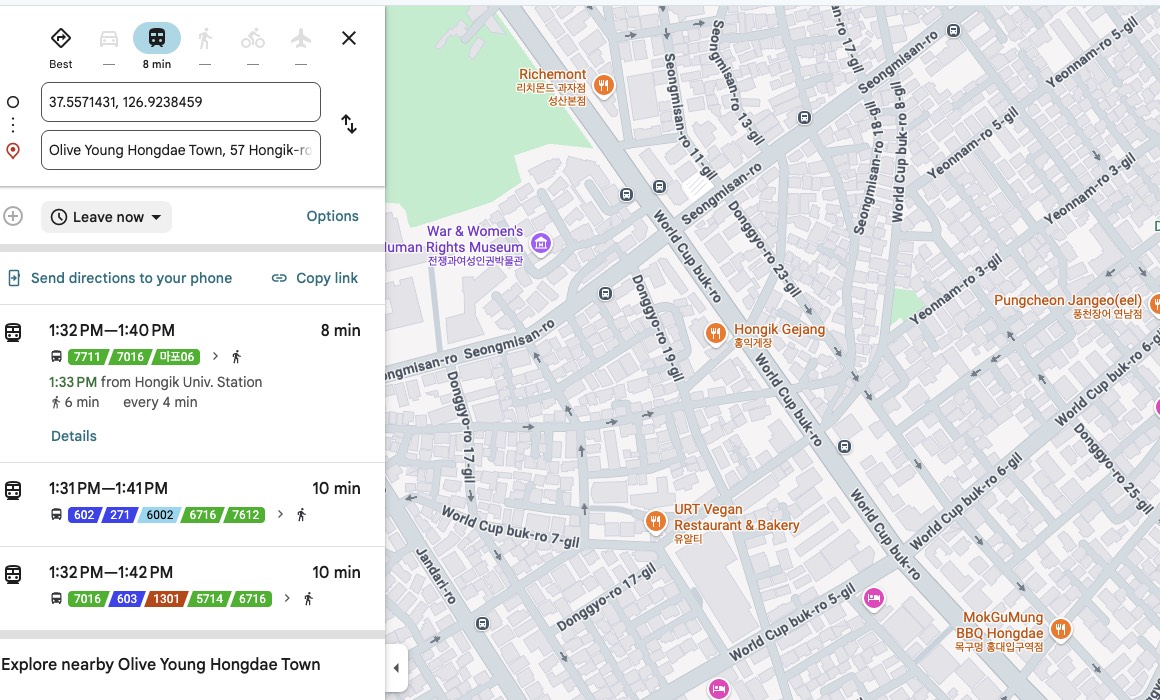
    The give-away is what Google offers instead. Put in a destination a few hundred metres away and every suggestion that comes back is a bus — and most of the quoted journey time is spent walking to the stop and away from it again, for a distance you could have covered on foot without stopping. Not one of the alternatives says “walk.” Google is not being obtuse. Transit is the only mode it is allowed to compute, so transit is the only answer it has.

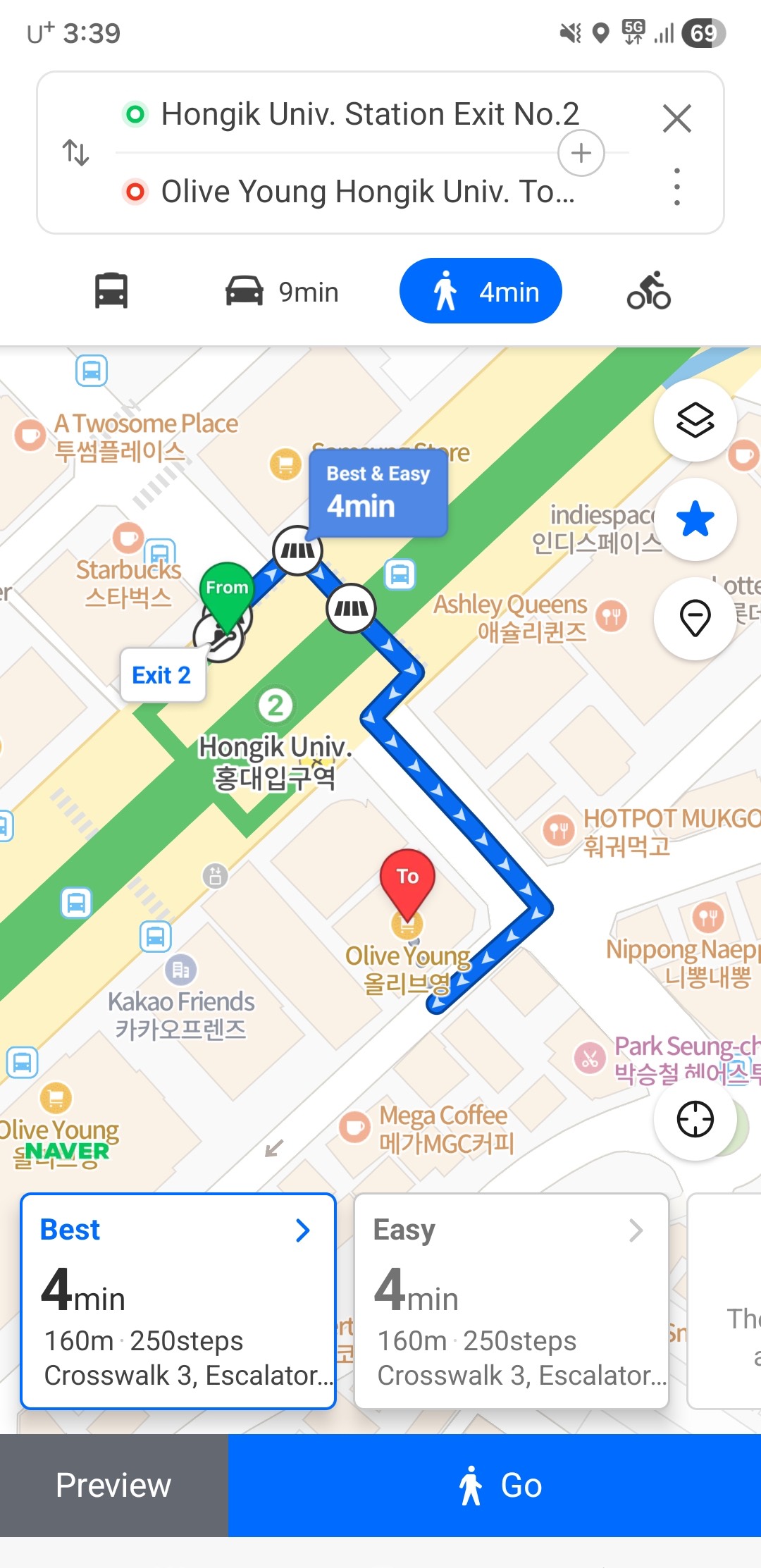
    Naver Map showing a walking route in English from Hongik Univ. Station Exit 2 to a nearby shop: 4 minutes, 160 metres, 250 steps, with a turn-by-turn line drawn on the map.
    The same kind of trip in Naver Map, in English: 4 minutes, 160 metres, 250 steps, turn by turn. This is the feature Google cannot offer here — not a worse version of it, the whole thing.
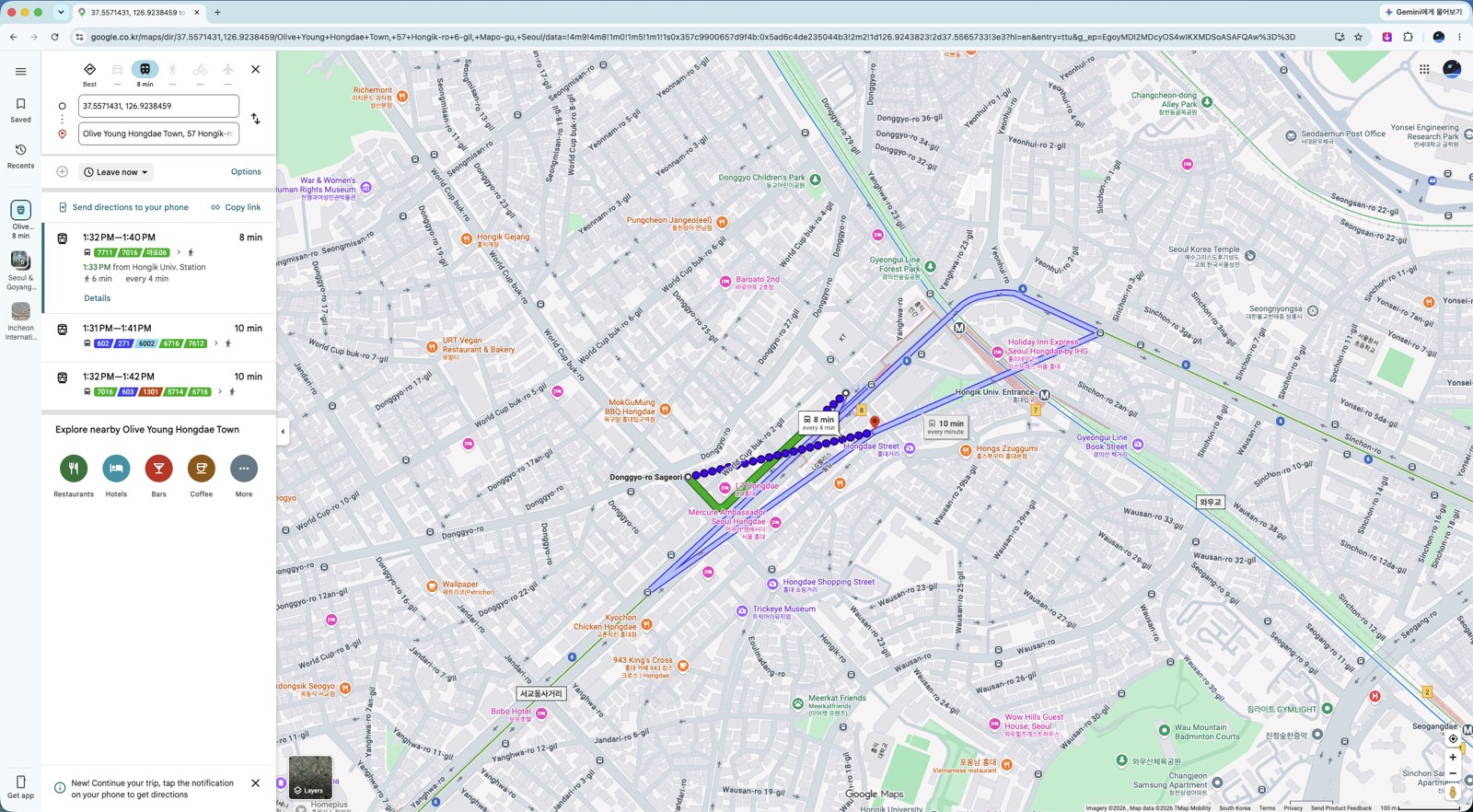
    Google Maps in Seoul returning three bus options for a walkable distance, with driving, walking and cycling unavailable.
    The same search in full. Hongik Univ. Station to Olive Young Hongdae Town — every option Google returns is a bus, and six of the eight minutes are spent walking anyway.

    Inside a transit route the same gap appears. The walking legs — station exit to your destination — come with no step-by-step guidance.

    That last part matters more than it sounds. Korean subway stations often have a dozen or more exits spread across several blocks. Coming out of the wrong one can mean a fifteen-minute correction.

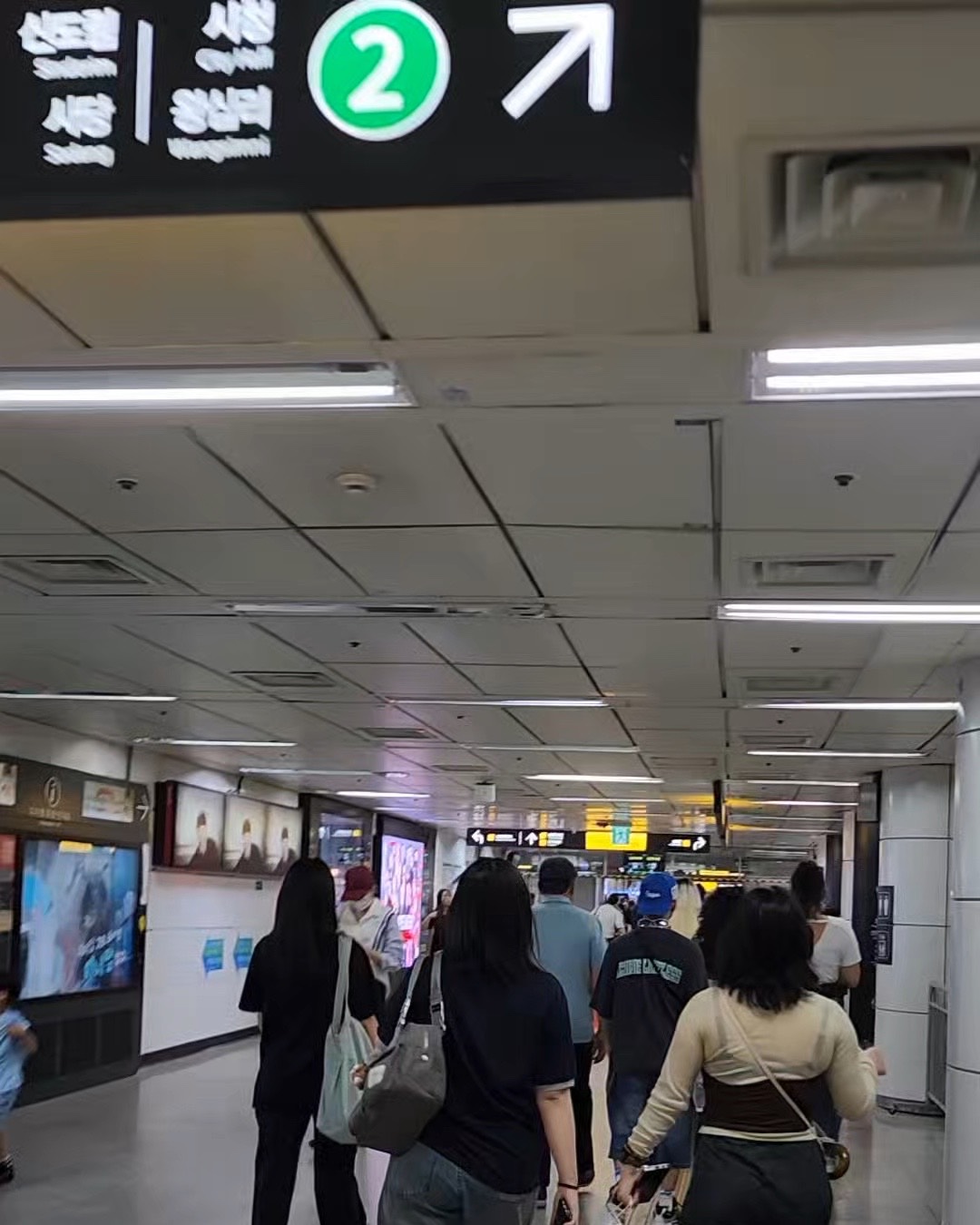
    An overhead sign inside a Seoul subway station showing exit number 2 with a directional arrow.
    Exit numbers are signposted clearly — but only once you are already inside the station. What Google Maps will not tell you is which number to aim for, and that is exactly where the missing walking directions cost you.

    One more thing the apps will not warn you about: on buses you have to tap your card again when getting off. Skip it and you lose the transfer discount — see the tap-out rule.

    2. Why it doesn’t work

    Korean law restricts exporting high-precision map data to servers outside the country. Google has served Korean maps from domestic servers since 2008, but the features that need Google’s own processing — walking directions, turn-by-turn navigation — were never possible under that arrangement.

    Google’s position is that routing requires “the enormous computing power of data centers distributed around the world,” which is why exporting the data is necessary rather than optional (Google Korea Q&A, August 2025).

    Worth noting: the data Google asked for is the 1:5000 national base map — already cleared through security review and already used by Naver and Kakao. The dispute was never about whether the data is secret.

    3. What changed in February 2026 — and what didn’t

    On February 27, 2026, an inter-agency committee under the National Geographic Information Institute approved conditional export of the 1:5000 high-precision map, closing an argument that had run for 18 years (ZDNet Korea).

    The committee included the Ministry of Land, the Ministry of National Defense, the National Intelligence Service, the Ministry of Foreign Affairs, and several others. Approval came with security conditions: imagery processing, restrictions on coordinate display, and continued use of domestic servers. The permission is limited to navigation and routing (Byline Network).

    Headlines at the time read like the problem was solved. It is not, yet.

    As of August 2026 — roughly six months after approval — walking and driving navigation still are not available in Google Maps in Korea, and no launch date has been announced.

    So if you read in February that Google Maps now works in Korea, that was permission being granted, not a feature shipping. Plan your trip on the assumption that it still does not work. If it launches while you are here, that is a bonus.

    4. Naver Map — install this one

    If you install one app, make it Naver Map. It has the strongest English support of the Korean options, accurate walking directions, and the most complete business listings — hours, photos, reviews, and which exit to use.

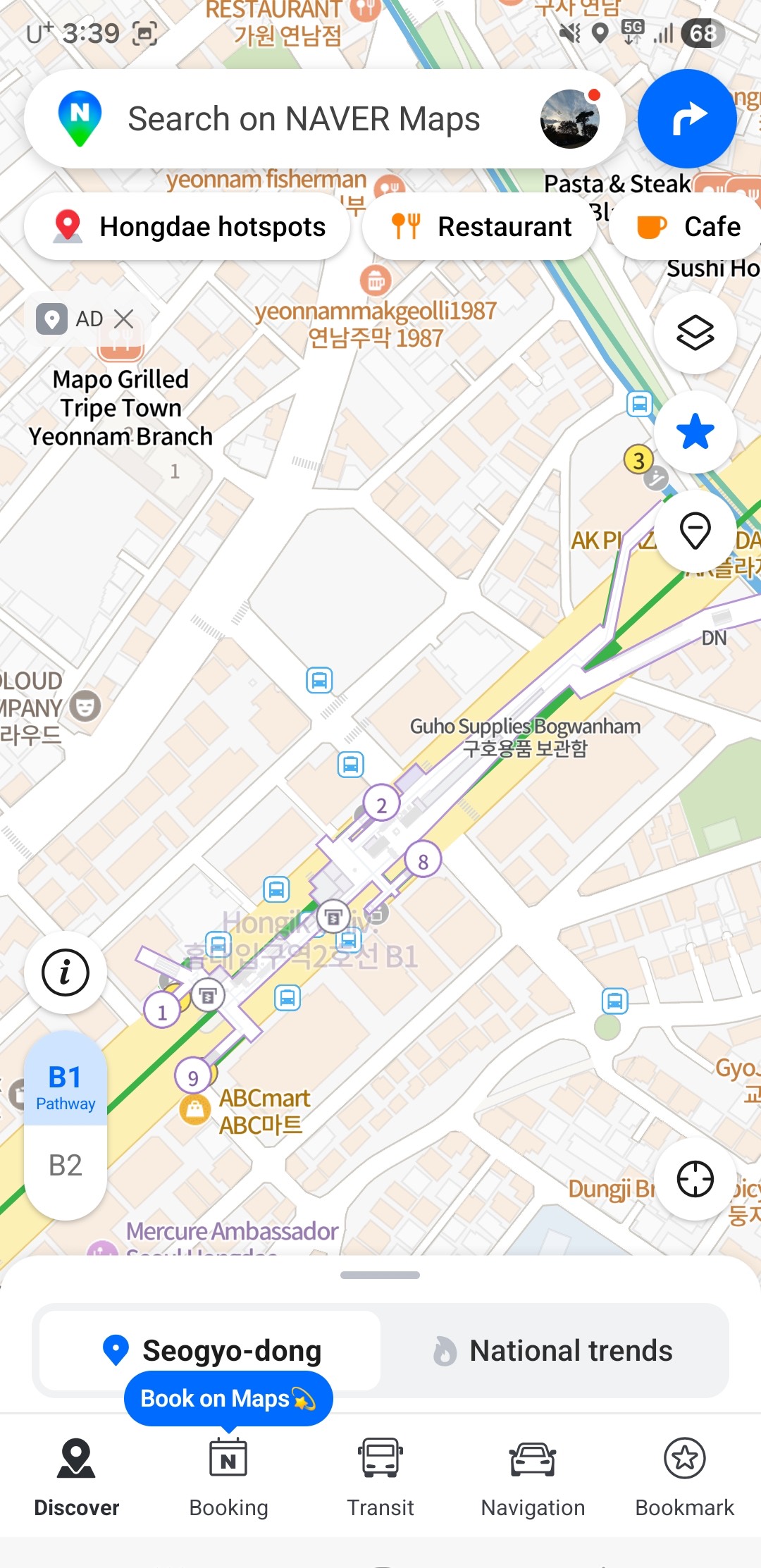
    The Naver Map home screen in English, with an English search bar and English category buttons along the bottom.
    What the app looks like once it is in English. If you have been putting this off because you expected a wall of Korean, this is the actual screen.

    It is probably already in English. Naver Map follows your phone’s language setting, so if your device is in English the app opens that way — no setup needed. Open it and check before hunting through menus.

    If it opened in Korean, switch it:

    1. Tap the menu icon (☰) in the top-left
    2. Tap the gear icon (⚙️) to open settings
    3. Find 언어 (Language) and choose English
    4. The app restarts in English — buttons, directions, and station names

    On desktop, go to map.naver.com, click the profile icon, and choose English in settings.

    (App layouts change with updates. If the icons have moved, look for the gear first, then the language entry.)

    Two things worth knowing:

    • You do not need an account. When a login screen appears, tap Skip or use Guest Mode. All core navigation works without a Korean phone number.
    • Place names often show in both Korean and English. This is deliberate and useful — you can show the Korean name to a taxi driver or shop staff.

    The limits: some reviews and smaller place names stay in Korean, and offline use is limited. Real-time navigation and transit need a connection.

    5. Kakao Map — the backup

    KakaoMap covers driving, walking, cycling, and public transit, and locals use it heavily. Its transit routing is as good as Naver’s.

    Its English support is weaker than Naver’s, so as a visitor it is harder to lean on as your only app.

    Where it earns its place on your phone: as a second opinion. Map apps disagree — about which exit is closest, whether a small shop is still open, how a complicated transfer actually works. When Naver gives you something that looks wrong, checking Kakao takes ten seconds.

    If you are only installing one app, install Naver. If you have room for two, this is the second.

    6. Before you arrive

    • Install Naver Map before you fly — download over your home wifi, not airport data
    • Switch it to English: ☰ → ⚙️ → 설정 → 언어 → English
    • Skip the login. No Korean phone number needed
    • Consider KakaoMap as a backup for cross-checking
    • Google Maps is still fine for subway routes — keep it, just do not rely on it to walk you anywhere
    • Do not assume the February 2026 approval means navigation works. Check on arrival; as of August 2026 it does not

    PART 2 — 한국어

    한국의 구글 지도에 대해 흔히 듣는 말이 두 가지 있고, 둘 다 정확하지 않습니다.

    첫째, “한국에서는 구글 지도가 안 된다.” 됩니다. 다만 가장 필요한 기능이 안 될 뿐입니다.

    둘째, “2026년 2월에 해결됐다.” 정부가 허가한 것은 맞습니다. 서비스는 아직 시작되지 않았습니다.

    2026년 8월 기준으로 정확한 상황과, 입국 전에 무엇을 준비해야 하는지 정리합니다.

    1. 되는 것과 안 되는 것

    한국에서 구글 지도가 백지로 나오지는 않습니다. 대부분은 정상적으로 작동합니다.

    안 됨
    지도 보기 도보 길찾기 (단계별 안내)
    장소 검색 자동차 내비게이션
    리뷰·사진·영업시간 자전거 길찾기
    지하철·버스 경로 대중교통 경로 안의 도보 구간 안내

    대부분의 방문자가 의외로 여기는 지점은 대중교통 길찾기가 된다는 것입니다. 서울교통공사가 공개 교통 데이터를 제공하기 때문에 지하철 경로는 상당히 정확합니다. 홍대에서 강남까지 어느 노선을 타야 하는지는 구글 지도가 알려줍니다.

    하지만 걸어서 데려다주지는 않습니다. 그리고 실패하는 방식이 꽤 노골적입니다.

    서울 안에서 두 지점을 놓고 길찾기를 하면 화면 위쪽 이동수단 줄을 보세요. 대중교통에만 시간이 나오고 자동차·도보·자전거는 대시(—)입니다. 계산 자체를 하지 않습니다. 부정확한 경로가 나오는 게 아니라 아예 경로가 없습니다.

    구글 지도 이동수단 줄 확대. 대중교통은 8분, 자동차·도보·자전거는 각각 대시로 표시된다.
    이동수단 줄 확대. 대중교통만 8분이 나오고 자동차·도보·자전거는 모두 대시입니다. 이 셋은 한국에서 아예 계산되지 않습니다.

    결정적인 건 대신 내놓는 답입니다. 몇백 미터 거리를 넣으면 돌아오는 안내가 전부 버스이고, 그 소요시간의 상당 부분이 정류장까지 걸어가고 내려서 다시 걸어가는 시간입니다. 그냥 쉬지 않고 걸으면 되는 거리인데도요. 대안 중 어느 것도 “걸으세요”라고 하지 않습니다. 구글이 어리석은 게 아니라, 계산할 수 있는 유일한 수단이 대중교통이라 그 답밖에 못 내놓는 것입니다.

    네이버지도의 영문 도보 길찾기. 홍대입구역 2번 출구에서 근처 매장까지 4분, 160m, 250걸음과 턴바이턴 경로가 표시돼 있다.
    같은 성격의 이동을 네이버지도에서 본 화면입니다. 영문으로 4분, 160m, 250걸음, 단계별 안내까지 나옵니다. 구글이 한국에서 제공하지 못하는 기능이 바로 이것입니다.
    걸어갈 거리인데 구글 지도가 버스 경로 세 개만 제시하는 화면.
    같은 검색의 전체 화면. 홍대입구역에서 올리브영 홍대 타운까지 — 돌아온 안내가 전부 버스이고, 8분 중 6분이 어차피 걷는 시간입니다.

    대중교통 경로 안에서도 같은 구멍이 생깁니다. 지하철 출구에서 목적지까지의 도보 구간에는 단계별 안내가 없습니다.

    이 마지막 부분이 생각보다 중요합니다. 한국 지하철역은 출구가 열 개를 넘고 여러 블록에 흩어져 있는 경우가 많습니다. 잘못된 출구로 나오면 15분을 되돌아가야 할 수도 있습니다.

    서울 지하철역 안의 2번 출구 안내 표지판과 방향 화살표.
    출구 번호는 역 안에서는 잘 표시돼 있습니다. 문제는 구글 지도가 몇 번 출구로 나가야 하는지를 알려주지 않는다는 점이고, 도보 안내의 부재가 실제로 손해를 끼치는 지점이 바로 여기입니다.

    지도 앱이 알려주지 않는 것이 하나 더 있습니다. 버스는 내릴 때도 카드를 대야 합니다. 놓치면 환승 할인을 잃습니다 — 하차 태그 규칙에 정리했습니다.

    2. 왜 안 되나

    한국 법은 정밀 지도 데이터를 국외 서버로 반출하는 것을 제한합니다. 구글은 2008년부터 국내 서버를 통해 한국 지도를 서비스해 왔지만, 구글 자체 연산이 필요한 기능 — 도보 길찾기, 턴바이턴 내비게이션 — 은 그 구조에서 제공할 수 없었습니다.

    구글의 설명은 길찾기가 “전 세계에 분산된 데이터센터의 막대한 컴퓨팅 파워”를 필요로 하기 때문에 반출이 선택이 아니라 필수라는 것입니다(구글코리아 Q&A, 2025년 8월).

    짚어둘 점은, 구글이 요청한 데이터가 1:5000 국가기본도라는 사실입니다. 이미 보안심사를 통과한 공개 데이터이고 네이버와 카카오도 쓰고 있습니다. 이 논쟁은 데이터가 비밀이냐 아니냐의 문제가 아니었습니다.

    3. 2026년 2월에 바뀐 것, 그리고 아직 안 바뀐 것

    2026년 2월 27일, 국토지리정보원 산하 협의체가 1:5000 고정밀 지도의 조건부 국외반출을 허가하면서 18년간 이어진 논쟁이 마무리됐습니다(ZDNet Korea).

    협의체에는 국토교통부, 국방부, 국가정보원, 외교부 등 관계 부처가 참여했습니다. 허가에는 영상 보안처리, 좌표 표시 제한, 국내 서버 활용이라는 조건이 붙었고, 범위는 내비게이션·길찾기로 한정됐습니다(바이라인네트워크).

    당시 기사 제목만 보면 문제가 해결된 것처럼 읽힙니다. 아직 아닙니다.

    2026년 8월 현재, 허가로부터 약 6개월이 지났지만 구글 지도의 도보·자동차 길찾기는 여전히 제공되지 않으며 서비스 개시 일정도 발표되지 않았습니다.

    2월에 “이제 한국에서 구글 지도가 된다”는 기사를 봤다면, 그건 허가가 났다는 뜻이지 기능이 나왔다는 뜻이 아닙니다. 아직 안 된다는 전제로 여행을 계획하세요. 머무는 동안 시작되면 그건 덤입니다.

    4. 네이버지도 — 이건 꼭 까세요

    하나만 설치한다면 네이버지도입니다. 한국 앱 중 영어 지원이 가장 낫고, 도보 안내가 정확하며, 업체 정보(영업시간·사진·리뷰·출입구)가 가장 충실합니다.

    영문으로 표시된 네이버지도 첫 화면. 검색창과 하단 메뉴가 모두 영어다.
    영어로 전환한 뒤의 화면입니다. 한글투성이일까 봐 미뤄뒀다면, 실제로 보게 될 화면은 이것입니다.

    대개는 이미 영어로 열립니다. 네이버지도는 휴대폰의 언어 설정을 따라가므로, 기기가 영어로 되어 있다면 앱도 영어로 실행됩니다. 메뉴를 뒤지기 전에 먼저 열어 확인해 보세요.

    한국어로 열렸다면 이렇게 바꿉니다.

    1. 왼쪽 위 메뉴 아이콘(☰) 을 누릅니다
    2. 톱니바퀴 아이콘(⚙️) 을 눌러 설정으로 들어갑니다
    3. 언어 항목에서 English 를 선택합니다
    4. 앱이 다시 시작되면서 버튼·길안내·역 이름이 영어로 바뀝니다

    PC에서는 map.naver.com에 접속해 프로필 아이콘을 누르고 설정에서 English를 고르면 됩니다.

    (앱 화면은 업데이트로 바뀝니다. 아이콘 위치가 다르면 톱니바퀴를 먼저 찾고 그 안에서 언어 항목을 찾으세요.)

    알아두면 좋은 두 가지

    • 계정이 필요 없습니다. 로그인 화면이 나오면 건너뛰기나 게스트 모드를 누르세요. 한국 전화번호 없이도 길찾기 기능은 모두 쓸 수 있습니다.
    • 장소 이름이 한국어와 영어로 함께 표시됩니다. 의도된 설계이고 유용합니다. 택시 기사나 가게 직원에게 한국어 이름을 그대로 보여줄 수 있습니다.

    한계도 있습니다. 일부 리뷰와 작은 장소 이름은 한국어로 남고, 오프라인 사용은 제한적입니다. 실시간 길안내와 대중교통 정보는 인터넷 연결이 필요합니다.

    5. 카카오맵 — 보조용

    카카오맵은 자동차·도보·자전거·대중교통을 모두 지원하고 현지인이 많이 씁니다. 대중교통 경로는 네이버지도만큼 좋습니다.

    다만 영어 지원이 네이버지도보다 약합니다. 외국인이 이것만 붙들고 다니기에는 어렵습니다.

    그럼에도 깔아둘 값어치는 두 번째 의견에 있습니다. 지도 앱은 서로 다른 답을 줄 때가 있습니다. 어느 출구가 가까운지, 작은 가게가 아직 영업 중인지, 복잡한 환승이 실제로 어떻게 되는지에서요. 네이버지도가 이상한 답을 줄 때 카카오맵으로 확인하는 데 10초면 됩니다.

    하나만 깐다면 네이버지도, 두 개를 깔 여유가 있다면 그다음이 이것입니다.

    6. 도착 전 체크리스트

    • 네이버지도를 출국 전에 설치하세요 — 공항 데이터 말고 집 와이파이에서
    • 영어로 전환: ☰ → ⚙️ → 설정 → 언어 → English
    • 로그인은 건너뛰세요. 한국 전화번호가 필요 없습니다
    • 카카오맵은 교차 확인용 보조로 고려
    • 구글 지도는 지하철 경로용으로는 계속 쓸 만합니다 — 다만 걸어서 안내받을 생각은 마세요
    • 2026년 2월 허가가 곧 서비스 개시는 아닙니다. 도착해서 확인해 보되, 2026년 8월 기준으로는 아직 안 됩니다

    함께 읽으면 좋은 글

    참고자료 / Sources

  • Olive Young’s AI Kiosk: Only 3 Stores Have It (2026)

    This guide is written in two parts. English first, Korean below. 이 글은 두 파트로 되어 있습니다. 영문이 먼저, 한국어가 아래에 있습니다.


    PART 1 — ENGLISH

    In July 2026, Olive Young put an AI avatar inside a kiosk and let it do what a staff member normally would: explain products, check stock, point you to the right shelf, and recommend something for your skin — in eight languages, without anyone having to speak Korean or English to each other.

    The coverage that followed described it as arriving at “large multi-floor stores with high foreign traffic.” That phrasing sent a lot of people to Myeongdong and Hongdae expecting to find one.

    It is in three stores. None of them is Myeongdong or Hongdae.

    Here is what the kiosk actually does, where it actually is, and what to do at the many stores that do not have one.

    1. What it is

    The kiosk runs a conversational AI avatar you talk to in real time. It launched on July 8, 2026, built on ESTsoft’s Perso Interactive avatar platform with a recommendation engine called AURA trained across tens of thousands of Olive Young product listings (Aju Press).

    The point is self-service. You are not queuing for a staff member and you are not miming at a shelf — you describe what you want in your own language and the screen answers.

    It handles 8 languages, including English, Chinese and Japanese. Olive Young has not published the full list of eight.

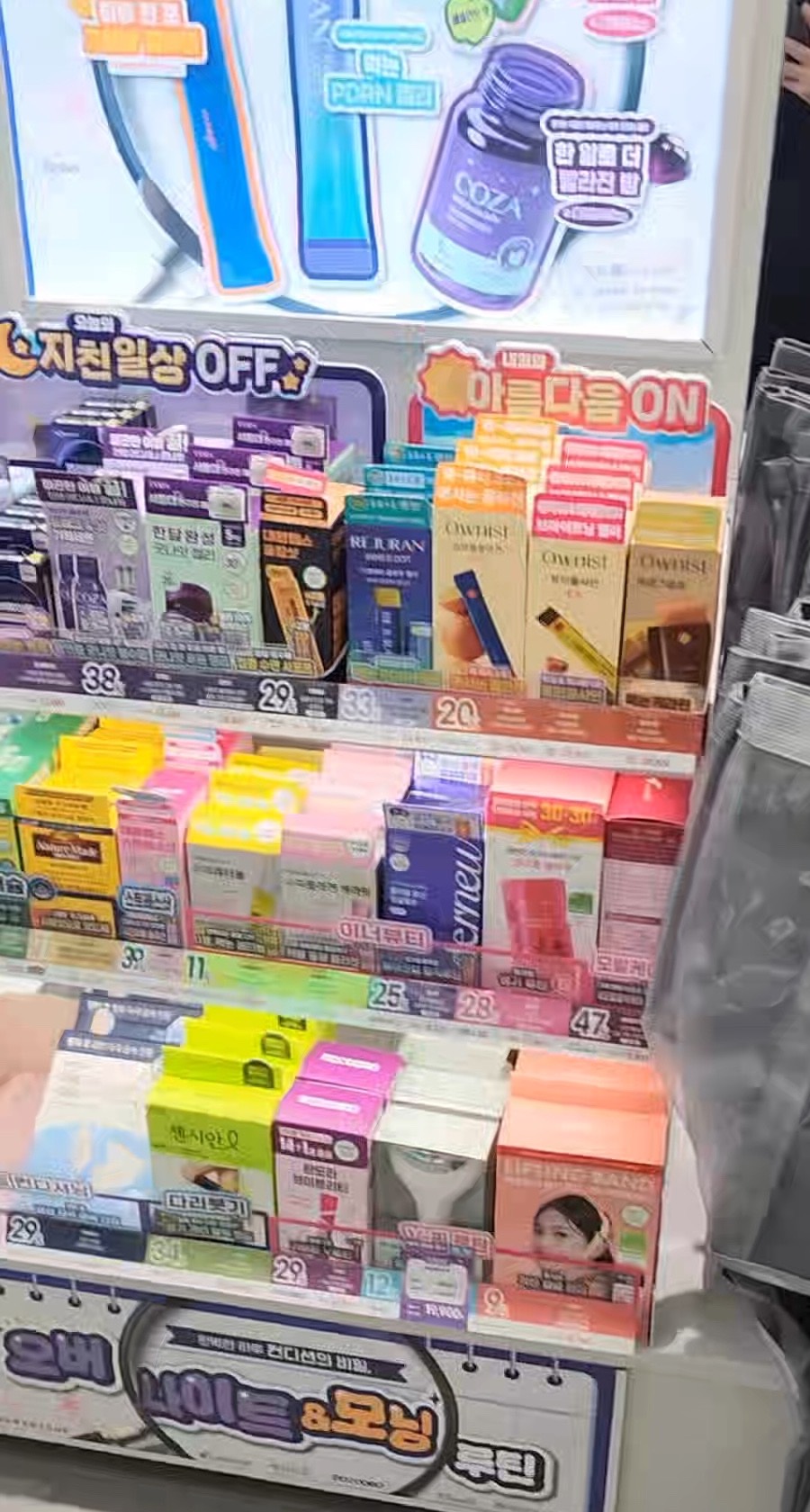
    A densely packed Olive Young display shelf, every product label and promotional sign written in Korean.
    This is the shelf you would otherwise be miming at. Product names, claims and promotional wording are all in Korean, and the price stickers alone will not tell you what something does.

    2. Where it actually is — three stores

    The initial rollout covers three Seoul branches (Aju Press):

    Store Area Why it was chosen
    Dongdaemun History & Culture Park Station Dongdaemun Shopping district, heavy tourist traffic
    Apgujeong Jungang Gangnam Affluent shopping area
    Ewha Jungang Sinchon / Ewha University area, young international visitors

    Not included: Myeongdong, Hongdae, Seongsu, or anywhere outside Seoul — despite these being the areas most tourist guides send you to.

    Olive Young says it plans to expand the service nationwide, but ESTsoft declined to give a timeline, citing confidentiality. So there is no published schedule to plan around. If you specifically want to try the kiosk, go to one of the three above.

    3. What it can do

    Four things, from one screen:

    • Explain products — what something is and how to use it
    • Check stock — whether the store has it before you hunt for it
    • Locate items in the store — which floor, which section
    • Recommend by skin type — you describe your skin concern, it suggests products

    It also answers the routine questions that eat the most staff time: payment methods and VAT refund procedures. If you were going to ask a cashier how tax refund works, the kiosk can tell you instead — and it will not be in a rush.

    (For the actual refund rules, including the ₩15,000 minimum that most guides get wrong, see our tax refund guide.)

    4. When you still need a person

    The kiosk does not replace staff for everything. For that, Olive Young runs a separate AI interpretation service covering 38 languages — far more than the kiosk’s eight.

    You use it one of two ways: scan a QR code the staff member gives you and chat in real time, or speak into a tablet microphone in the store. It is trained on K-beauty vocabulary, so ingredient names and product terminology come through correctly rather than mangled by a general translator.

    This service appears to be more widely deployed than the kiosks, but Olive Young has not confirmed which stores have it. If you are at a store with no kiosk, still ask — a staff member may be able to pull up interpretation.

    5. Why this exists

    Not a marketing gimmick, as it turns out. An internal Olive Young survey found that roughly 69% of staff reported language barriers with customers (Aju Press). Two out of three employees were regularly unable to help someone properly.

    The kiosk is aimed at foreign shoppers in their 20s and 30s — the group most likely to walk in with a specific product in mind from social media and least likely to want a conversation about it.

    Reading it that way tells you what the kiosk is good at. It is built for “I know roughly what I want, just point me at it” rather than open-ended advice. If you want a genuine consultation, the interpretation service plus a human is still the better route.

    6. Before you go

    • The kiosk exists at three Seoul stores only: Dongdaemun History & Culture Park Station, Apgujeong Jungang, Ewha Jungang
    • Myeongdong and Hongdae do not have it regardless of what general guides imply
    • Kiosk covers 8 languages; staff interpretation covers 38
    • No kiosk at your store? Ask staff about interpretation anyway
    • Use it for product info, stock, location, skin recommendations, and tax refund questions
    • Nationwide expansion is planned but no date has been published — check before making a trip for it

    PART 2 — 한국어

    2026년 7월, 올리브영이 키오스크 안에 AI 아바타를 넣고 직원이 하던 일을 맡겼습니다. 상품 설명, 재고 확인, 매장 내 위치 안내, 피부에 맞는 제품 추천까지 — 8개 국어로, 서로 한국어나 영어를 하지 않아도 되는 방식으로요.

    이후 기사들은 “외국인 비중이 높은 복층 대형 매장”에 도입된다고 전했습니다. 그 표현 때문에 많은 사람이 명동과 홍대에서 키오스크를 찾았습니다.

    실제로는 세 곳뿐이고, 그중에 명동도 홍대도 없습니다.

    키오스크가 실제로 무엇을 하는지, 어디에 있는지, 없는 매장에서는 어떻게 해야 하는지 정리했습니다.

    1. 무엇이 생겼나

    실시간으로 대화하는 AI 아바타가 들어간 키오스크입니다. 2026년 7월 8일 도입됐고, 이스트소프트의 대화형 AI 아바타 플랫폼 Perso Interactive에 수만 건의 올리브영 상품 정보를 학습한 추천 엔진 AURA를 결합했습니다(아주프레스).

    핵심은 셀프 쇼핑입니다. 직원을 기다리거나 진열대 앞에서 손짓할 필요 없이, 원하는 것을 자기 언어로 말하면 화면이 답합니다.

    8개 국어를 지원하며 영어·중국어·일본어가 포함됩니다. 여덟 개 전체 목록은 공개되지 않았습니다.

    빽빽하게 진열된 올리브영 매대. 제품 라벨과 판촉 문구가 모두 한글이다.
    키오스크가 없다면 손짓으로 물어봐야 할 매대입니다. 제품명도 설명도 판촉 문구도 한글이고, 가격표만 봐서는 그게 뭘 하는 물건인지 알 수 없습니다.

    2. 어디에 있나 — 세 곳뿐

    초기 도입 매장은 서울 세 곳입니다(아주프레스).

    매장 지역 선정 배경
    동대문역사문화공원역점 동대문 쇼핑 상권, 관광객 밀집
    압구정중앙점 강남 고소득 쇼핑 상권
    이화중앙점 신촌·이대 대학가, 젊은 외국인 방문객

    포함되지 않은 곳: 명동, 홍대, 성수, 그리고 서울 외 전 지역. 여행 가이드가 가장 많이 보내는 곳들이 빠져 있습니다.

    올리브영은 전국 확대 계획을 밝혔지만, 이스트소프트는 기밀을 이유로 일정 공개를 거절했습니다. 공개된 일정이 없으니 계획을 세울 근거도 없습니다. 키오스크를 꼭 써 보고 싶다면 위 세 곳으로 가야 합니다.

    3. 무엇을 할 수 있나

    화면 하나에서 네 가지가 됩니다.

    • 상품 설명 — 이게 무엇이고 어떻게 쓰는지
    • 재고 조회 — 찾아 헤매기 전에 있는지 확인
    • 매장 내 위치 — 몇 층, 어느 구역인지
    • 피부 맞춤 추천 — 피부 고민을 말하면 제품을 제안

    직원 시간을 가장 많이 쓰던 반복 문의도 처리합니다. 결제 방법과 부가세 환급 절차입니다. 계산대에서 택스리펀드를 물어보려 했다면 키오스크에 물어도 되고, 이쪽은 재촉하지 않습니다.

    (환급 규칙 자체는 영문 가이드 대부분이 틀리는 1만 5천원 기준을 포함해 택스리펀드 안내에 정리했습니다.)

    4. 사람이 필요할 때

    키오스크가 모든 것을 대신하지는 않습니다. 그래서 별도로 38개 언어를 지원하는 AI 통역 서비스를 운영합니다. 키오스크의 8개보다 훨씬 많습니다.

    이용 방법은 두 가지입니다. 직원이 주는 QR을 스캔해 실시간 채팅을 하거나, 매장의 태블릿에 대고 말하면 됩니다. K뷰티 어휘를 학습해서 성분명이나 제품 용어가 일반 번역기처럼 뭉개지지 않고 정확히 전달됩니다.

    이 서비스는 키오스크보다 넓게 배포된 것으로 보이지만, 어느 매장에 있는지는 공개되지 않았습니다. 키오스크가 없는 매장이라도 일단 물어보세요. 직원이 통역을 꺼내 줄 수 있습니다.

    5. 왜 만들었나

    홍보용 장치만은 아니었습니다. 올리브영 내부 조사에서 직원 약 69%가 고객과의 언어 장벽을 겪는다고 답했습니다(아주프레스). 세 명 중 두 명이 손님을 제대로 돕지 못하는 상황을 겪고 있었다는 뜻입니다.

    대상은 20~30대 외국인 고객입니다. SNS에서 특정 제품을 정해 오고, 그것에 대해 대화하고 싶어 하지는 않는 층이죠.

    이렇게 읽으면 키오스크가 무엇에 강한지도 보입니다. “뭘 원하는지는 대충 아니까 어디 있는지만 알려달라”에 맞춰져 있습니다. 제대로 된 상담을 원한다면 통역 서비스와 사람 쪽이 여전히 낫습니다.

    6. 가기 전에

    • 키오스크가 있는 곳은 서울 세 곳뿐 — 동대문역사문화공원역점, 압구정중앙점, 이화중앙점
    • 일반 가이드가 무엇을 암시하든 명동과 홍대에는 없습니다
    • 키오스크 8개 국어, 직원 통역 38개 언어
    • 키오스크가 없는 매장이라도 직원에게 통역을 물어보세요
    • 상품 정보·재고·위치·피부 추천·택스리펀드 문의에 쓸 수 있습니다
    • 전국 확대는 예정돼 있지만 일정이 공개되지 않았습니다 — 이것 때문에 방문한다면 미리 확인하세요

    함께 읽으면 좋은 글

    참고자료 / Sources